Steering video with images and clips

The toggle at the right of the thumbnail strip sets how the selection is used. Its options depend on the model and the number of selected items.
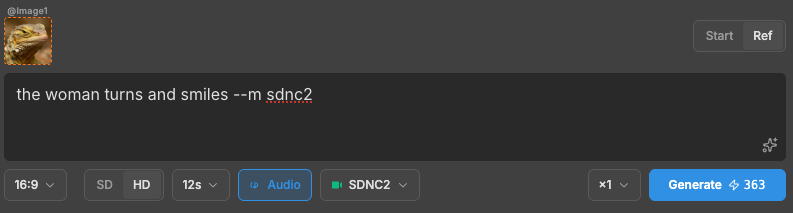
Set it to Ref and the images are used as references for look, subject and style instead of frames. The prompt decides what happens in the clip.
What the toggle can say
| You see | What it means |
|---|---|
| SEQ / GRP | Image models. One result per input, or one result from all of them |
| S / S+E | One clip per image, or images paired as start and end frames |
| Start / Ref | One image selected on a reference-capable model. Use it as the first frame or as a reference |
| S / S+E / Ref | Two or more images on a reference-capable model. All three options are available |
| just a label | Only one mode is possible. There is nothing to pick |
The toggle shows only the choices the current model and selection support.
Frames vs references
Frames and references produce different results.
A frame is a position. The image is the first (or last) moment of the clip, and the model animates from it. Use it to animate a still.
A reference is a hint. The model does not reproduce the image. It takes the look, the subject and the styling and makes a new clip that matches. Use it for a clip like the references rather than one that starts on them.
The same images and prompt give different output in each mode. In Ref mode, videos can
be mixed in, and the prompt can point at a specific one with @.
In S+E the strip is labelled as Start/End pairs with a divider. An odd image is dimmed out; only pairs are used. Drag thumbnails to change the pairing.
When a combination is not supported, Generate is greyed out and the panel shows the reason.
What each video model can do
The selection decides which mode runs. Not every model supports every mode:
| From a prompt | Start frame | Start + end | References | Edit a clip | |
|---|---|---|---|---|---|
| KLN3 Kling 3.0 | ✓ | ✓ | ✓ | — | — |
| KLNO1 Kling O1 | — | ✓ | ✓ | 7 images | ✓ |
| SDNC Seedance 1.5 | ✓ | ✓ | ✓ | — | — |
| SDNC2 Seedance 2.0 | ✓ | ✓ | ✓ | 9 images + 3 clips | — |
| SDNC2M Seedance 2.0 Mini | ✓ | ✓ | ✓ | 9 images + 3 clips | — |
| MMH3 MiniMax H3 | ✓ | ✓ | ✓ | 9 images + 3 clips | — |
Notes on the table:
- KLNO1 is the only model that edits an existing clip. Give it a video and a prompt and it reworks the footage. It is also the only model with no prompt-only mode. It always needs an input.
- KLN3 is the only model that takes reference images alongside a start frame. Up to three references are sent with the frame, not instead of it. Every other model treats references as a separate mode.
- KLN3 and SDNC take no references. Frames only.
- MMH3 has no SD/HD switch. The panel hides the control. The model has no quality tier.